Next.js SOLID Principles
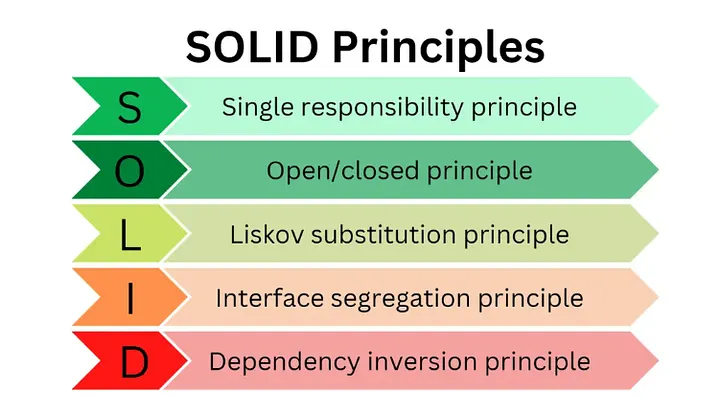
When building modern web applications with Next.js, adhering to solid software design principles can greatly enhance the maintainability, scalability, and readability of your code. The SOLID principles — Single Responsibility, Open/Closed, Liskov Substitution, Interface Segregation, and Dependency Inversion — offer a clear guideline for writing better code. In this article, we’ll explore each of these principles with examples in Next.js, highlighting common pitfalls and how to avoid them.
- Single Responsibility Principle (SRP) Bad Example A common violation of SRP occurs when a single component handles multiple responsibilities, such as fetching data and rendering UI.
// components/UserProfile.js
import { useEffect, useState } from 'react';

const UserProfile = ({ userId }) => {
    const [user, setUser] = useState(null);
    useEffect(() => {
        const fetchUserData = async () => {
            const response = await fetch(`/api/users/${userId}`);
            const data = await response.json();
            setUser(data);
        };
        fetchUserData();
    }, [userId]);
    return user ? (
        <div>
            <h1>{user.name}</h1>
            <p>{user.email}</p>
        </div>
    ) : (<p>Loading...</p>);
};

export default UserProfile;
Fix: Adhering to SRP
By separating data fetching into a service and focusing the component solely on rendering, we align with SRP.

// services/userService.js
export const fetchUserData = async (userId) => {
    const response = await fetch(`/api/users/${userId}`);
    const data = await response.json();
    return data;
};

// components/UserProfile.js
const UserProfile = ({ user }) => (
  <div>
    <h1>{user.name}</h1>
    <p>{user.email}</p>
  </div>
);

export default UserProfile;

// pages/user/[id].js
import { useEffect, useState } from 'react';
import UserProfile from '../../components/UserProfile';
import { fetchUserData } from '../../services/userService';

const UserPage = ({ userId }) => {
const [user, setUser] = useState(null);

useEffect(() => {
    fetchUserData(userId).then(data => setUser(data));
    }, [userId]);
    return user ? <UserProfile user={user} /> : <p>Loading...</p>;
};

export default UserPage;// components/Button.js
const Button = ({ onClick, children, log }) => {
const handleClick = () => {
if (log) {
console.log('Button clicked!');
}
onClick();
};
return <button onClick={handleClick}>{children}</button>;
};
export default Button;
Fix: Adhering to OCP
Using higher-order components (HOCs) to extend functionality without modifying the original component.
// components/Button.js
const Button = ({ onClick, children }) => (
<button onClick={onClick}>{children}</button>
);
export default Button;
// components/withLogging.js
const withLogging = (WrappedComponent) => (props) => {
const handleClick = () => {
console.log('Button clicked!');
props.onClick();
};
return <WrappedComponent {...props} onClick={handleClick} />;
};
export default withLogging;
// pages/index.js
import Button from '../components/Button';
import withLogging from '../components/withLogging';
const LoggingButton = withLogging(Button);
const HomePage = () => (
<div>
<h1>Home Page</h1>
<LoggingButton onClick={() => alert('Hello!')}>Click Me</LoggingButton>
</div>
);
export default HomePage;// components/BaseButton.js
const BaseButton = ({ onClick, children }) => (
<button onClick={onClick}>{children}</button>
);
export default BaseButton;
// components/ColoredButton.js
const ColoredButton = ({ onClick, children, color }) => (
<button onClick={onClick} style={{ color }}>{children}</button>
);
export default ColoredButton;
// pages/index.js
import BaseButton from '../components/BaseButton';
import ColoredButton from '../components/ColoredButton';
const HomePage = () => (
<div>
<h1>Home Page</h1>
<BaseButton onClick={() => alert('Base clicked!')}>Base Button</BaseButton>
<ColoredButton onClick={() => alert('Colored clicked!')} color="blue">Colored Button</ColoredButton>
</div>
);
export default HomePage;
Fix: Adhering to LSP
Ensuring that subclasses can be used interchangeably with their parent class without breaking the application.
// components/BaseButton.js
const BaseButton = ({ onClick, children, style }) => (
<button onClick={onClick} style={style}>{children}</button>
);
export default BaseButton;
// components/PrimaryButton.js
const PrimaryButton = ({ onClick, children }) => (
<BaseButton onClick={onClick} style={{ color: 'blue' }}>{children}</BaseButton>
);
export default PrimaryButton;
// components/SecondaryButton.js
const SecondaryButton = ({ onClick, children }) => (
<BaseButton onClick={onClick} style={{ color: 'gray' }}>{children}</BaseButton>
);
export default SecondaryButton;
// pages/index.js
import PrimaryButton from '../components/PrimaryButton';
import SecondaryButton from '../components/SecondaryButton';
const HomePage = () => (
<div>
<h1>Home Page</h1>
<PrimaryButton onClick={() => alert('Primary clicked!')}>Primary Button</PrimaryButton>
<SecondaryButton onClick={() => alert('Secondary clicked!')}>Secondary Button</SecondaryButton>
</div>
);
export default HomePage;- Interface Segregation Principle (ISP)
Bad Example
Forcing components to implement methods or use properties they do not need violates ISP.
// interfaces/User.ts export interface User { id: string; name: string; email: string; address: string; phone: string; } // components/UserProfile.tsx import { User } from '../interfaces/User'; const UserProfile: React.FC<{ user: User }> = ({ user }) => ( <div> <h1>{user.name}</h1> <p>{user.email}</p> <p>{user.address}</p> <p>{user.phone}</p> </div> ); export default UserProfile; Fix: Adhering to ISP Creating smaller, more specific interfaces to ensure components only depend on what they need. // interfaces/User.ts export interface User { id: string; name: string; email: string; } // interfaces/UserDetails.ts export interface UserDetails extends User { address: string; phone: string; } // components/UserProfile.tsx import { User } from '../interfaces/User'; interface UserProfileProps { user: User; } const UserProfile: React.FC<UserProfileProps> = ({ user }) => ( <div> <h1>{user.name}</h1> <p>{user.email}</p> </div> ); export default UserProfile; // components/UserDetailsProfile.tsx import { UserDetails } from '../interfaces/UserDetails'; interface UserDetailsProfileProps { user: UserDetails; } const UserDetailsProfile: React.FC<UserDetailsProfileProps> = ({ user }) => ( <div> <h1>{user.name}</h1> <p>{user.email}</p> <p>{user.address}</p> <p>{user.phone}</p> </div> ); export default UserDetailsProfile; // pages/user/[id].tsx import { useEffect, useState } from 'react'; import UserProfile from '../../components/UserProfile'; import UserDetailsProfile from '../../components/UserDetailsProfile'; import { User, UserDetails } from '../../interfaces/UserDetails'; const UserPage = ({ userId }) => { const [user, setUser] = useState<User | UserDetails>(null); useEffect(() => { // Fetch user data // Assuming API returns either User or UserDetails fetchUserData(userId).then(data => setUser(data)); }, [userId]); return user ? ( user.hasOwnProperty('address') ? ( <UserDetailsProfile user={user as UserDetails} /> ) : ( <UserProfile user={user as User} /> ) ) : ( <p>Loading...</p> ); }; export default UserPage; - Dependency Inversion Principle (DIP) Bad Example High-level modules depending directly on low-level modules can lead to tight coupling and difficulty in testing and maintaining code.
// pages/user/[id].tsx
import { useEffect, useState } from 'react';

const UserPage = ({ userId }) => {
    const [user, setUser] = useState(null);
    useEffect(() => {
        const fetchUserData = async () => {
            const response = await fetch(`/api/users/${userId}`);
            const data = await response.json();
            setUser(data);
        };
            fetchUserData();
    }, [userId]);
    return user ? (
        <div>
            <h1>{user.name}</h1>
            <p>{user.email}</p>
        </div>
    ) : (
        <p>Loading...</p>
    );
};

export default UserPage;
Fix: Adhering to DIP
Using dependency injection to decouple high-level modules from low-level modules.

// services/ApiService.ts
export interface ApiService {
fetchUserData(userId: string): Promise<any>;
}

export class FetchApiService implements ApiService {
    async fetchUserData(userId: string) {
        const response = await fetch(`/api/users/${userId}`);
        return response.json();
    }
}

// context/ApiContext.ts
import React, { createContext, useContext } from 'react';
import { ApiService, FetchApiService } from '../services/ApiService';

const ApiContext = createContext<ApiService>(new FetchApiService());

export const useApi = () => useContext(ApiContext);

// pages/_app.tsx
import { AppProps } from 'next/app';
import { ApiContext } from '../context/ApiContext';
import { FetchApiService } from '../services/ApiService';

const App = ({ Component, pageProps }: AppProps) => (
    <ApiContext.Provider value={new FetchApiService()}>
    <Component {...pageProps} />
    </ApiContext.Provider>
);

export default App;

// pages/user/[id].tsx
import { useEffect, useState } from 'react';
import { useApi } from '../../context/ApiContext';
import UserProfile from '../../components/UserProfile';

const UserPage = ({ userId }) => {
const [user, setUser] = useState(null);
const api = useApi();

useEffect(() => {
    api.fetchUserData(userId).then(data => setUser(data));
    }, [userId, api]);

    return user ? <UserProfile user={user} /> : <p>Loading...</p>;
};

export default UserPage;Single Responsibility Principle (SRP) By adhering to SRP, you ensure that each component or module has a single responsibility, making your code easier to understand, test, and maintain. This separation of concerns prevents changes in one part of your application from inadvertently affecting others, leading to a more stable and predictable codebase.
Open/Closed Principle (OCP) Following OCP allows your application to grow and adapt to new requirements without altering existing, tested code. This principle encourages the use of abstractions, such as interfaces or abstract classes, and promotes the creation of flexible and extensible software architectures.
Liskov Substitution Principle (LSP) LSP ensures that subclasses or derived classes can be used interchangeably with their base classes without causing unexpected behaviors. This principle promotes the design of components that are more reusable and interchangeable, facilitating easier updates and maintenance.
Interface Segregation Principle (ISP) ISP advocates for the use of small, specific interfaces instead of large, monolithic ones. This principle reduces the impact of changes and minimizes the dependencies between components, making your application more modular and easier to understand.
Dependency Inversion Principle (DIP) DIP encourages the decoupling of high-level modules from low-level modules by relying on abstractions. This principle leads to more flexible and testable code, as dependencies can be easily swapped out without altering the high-level logic.
Real-World Impact Implementing the SOLID principles in a Next.js project offers several tangible benefits:
Improved Maintainability: With clearly defined responsibilities and modular design, your code becomes easier to maintain and evolve. Enhanced Readability: Each component or module having a single responsibility makes the code more intuitive and easier to understand for new developers joining the project. Greater Flexibility: Adhering to OCP and DIP allows you to extend and modify your application with minimal risk of breaking existing functionality. Reduced Complexity: By following ISP and LSP, you ensure that your codebase remains clean and modular, reducing the complexity of individual components and the overall system. Better Testing: SOLID principles make your code more testable by promoting loose coupling and clear interfaces, enabling more effective unit and integration testing. Final Thoughts Incorporating the SOLID principles into your Next.js applications is not just a theoretical exercise but a practical approach to building software that can withstand the test of time. As projects grow in complexity, the benefits of a SOLID foundation become increasingly apparent. By investing in these principles from the outset, you set your project up for long-term success, making it easier to accommodate new features, fix bugs, and onboard new team members.
Sharing is caring!